
Free PNG Tools — Background Remover, Compressor & More
Browser-based image tools. Remove backgrounds, compress, convert, resize, and create stickers — all free, no signup, 100% private.
Drop an image here or click to upload
PNG, JPG, WebP — processed locally in your browser
A browser-native PNG workflow that works naturally in agent flows
PNGmaker is designed as a premium workflow for humans first, with a structure simple enough to work naturally in lightweight browser-based agent workflows too.
- No server uploads — agents don't expose user data
- Predictable UI — simple input → process → download flow
- Zero API costs — all processing runs in the browser
More PNG tools
Compress, convert, resize, create stickers, and more — all in the browser.
Compress PNG
Optimize PNGs in batch without uploading to a server.
Open tool→Sticker maker
Add borders to PNGs to create stickers. Choose color, thickness, padding and shadow.
Open tool→Image Converter
Convert PNG, JPG, WebP, AVIF and more — all in your browser, no upload.
Open tool→PNG Resizer
Resize PNG images to any dimensions. Crop and scale in your browser.
Open tool→Color replacer
Scan PNG colors, group by similarity, and replace with a color picker.
Open tool→Popular PNG tools
Popular transparent PNG workflows
Jump straight to common high-intent tasks people search for.
home.removeWhiteBackground
home.removeWhiteBackgroundDesc
Open workflow →Transparent signature maker
Turn a scanned signature into a transparent PNG for documents.
Open workflow →Remove background from logo
Clean logo files for websites, slides, and brand assets.
Open workflow →Remove background from headshot
Create transparent profile photos for team pages, resumes, and bios.
Open workflow →Remove background from clothing photos
Useful for apparel listings, ads, and fashion catalog images.
Open workflow →Remove background from jewelry photos
Prepare premium jewelry cutouts for product pages and campaigns.
Open workflow →Remove background from signature
A direct workflow for signature cleanup and transparent export.
Open workflow →See PNGmaker in action
Original image vs transparent PNG result. Drag the slider to compare.
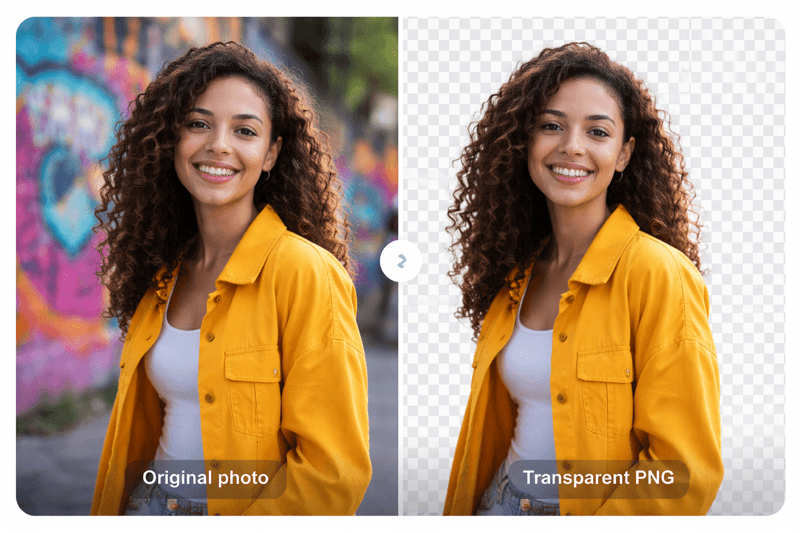
Use cases
Logos
Create transparent logos for websites and branding
Product images
Clean product photos for e-commerce listings
Profile pictures
Professional headshots with transparent backgrounds
Stickers
Custom stickers for messaging and design
Design assets
PNG assets for graphics and presentations
How to create a transparent PNG
Upload your image
Drag and drop or select an image file
Remove background automatically
AI detects the subject and removes the background
Download your PNG
Get your transparent PNG instantly
Why PNGmaker?
PNGmaker is free and unlimited for domestic use. All processing runs in your browser—no uploads, no server costs, no data leaves your device. Personal use is always free.
100% browser-based
All processing runs locally—no uploads to our servers
No uploads required
Your images never leave your device. Full privacy.
Fast batch processing
Handle up to 50 files at once. Download as ZIP.
Free and unlimited
No sign-up, no limits. Personal use is always free.
PNGmaker API
Process thousands of images with our PNG tools API. Remove backgrounds, convert formats, and optimize PNG files at scale.
View API docs→Frequently asked questions
How do I make a PNG transparent?
Upload your image to PNGmaker, use the Remove Background tool, and download the result. Our AI automatically detects the subject and removes the background—all in your browser.
What is a transparent PNG?
A transparent PNG is an image where parts of it have no background—they show whatever is behind them. PNG is one of the few formats that supports transparency, ideal for logos and overlays.
How do I remove the background from an image?
Use PNGmaker's Remove Background tool. Upload your image, and our AI removes the background in one click. No uploads to servers—processing runs entirely in your browser.
Why use PNG instead of JPG?
PNG supports transparency and lossless quality, making it ideal for logos, graphics, and images with sharp edges. JPG is better for photos where smaller file size matters.
Is PNGmaker free?
Yes. PNGmaker is free for personal use. All processing runs in your browser—no uploads to our servers, no sign-up required.
Guides & Resources
View all →Tutorials, format explainers, and use-case walkthroughs to help you get the most out of PNG images.
All tools
Compress PNG
Optimize PNGs in batch without uploading to a server.
Batch compress PNG
Quick queue for many large files.
Remove PNG metadata
Strip EXIF and metadata to reduce size and improve privacy.
PNG → WEBP
Convert PNG to WEBP with good quality/size ratio.
WEBP → PNG
Get compatible PNGs from WEBP files.
PNG → JPG
Convert PNG with solid background to lighter JPG.
JPG → PNG
Convert JPG to PNG while keeping quality.
Quick editor
Crop, resize and rotate in a lightweight interface.
Remove background
AI-powered background removal in the browser. No uploads, works with any image.